Buscando un concepto EDU.IT

“...el contexto sociotecnológico generen un nuevo modelo de escuela que responda a las necesidades formativas de los ciudadanos...” Adell Castañeda

Buscando un concepto EDU.IT (parte 2)

¿Cuál es la situación actual y cuál la deseada? ¿Cómo haremos realidad un proceso de innovación?

Learn to use the Core Google for Edu apps

Google offers a free-of-cost learning center for teachers that want to learn how to use GAFE. Learn at your own pace.

Documentar los proyectos como estrategia de aprendizaje

La documentación de procesos educativos está cobrando cada vez más importancia. Pero, ¿cómo comenzar a documentar? ¿Cuáles son las primeras consideraciones?

Personal information protection

Many websites gather personal information from their visitors. Some tips for beginners.

Tuesday, June 14, 2016

Aprende GAFE / Learn GAFE


Google Apps for Education (GAFE) is a core suite of productivity applications that Google offers to schools and educational institutions for FREE. These communication and collaboration apps include Gmail, Calendar, Drive, Docs and Sites, and a GAFE account unlocks access to dozens of other collaborative tools supported by Google. All of these applications exists completely online (or in the cloud), meaning that all creations can be accessed from any device with an Internet connection. Once a school decides to embrace Google Apps for Education, they can register their school domain (web address), and administer all teacher and student accounts from an administrative dashboard.

Google offers a free-of-cost learning center for teachers that want to learn how to use GAFE. Below a list of learn-by-product tutorials you might want to explore.

 Communicate


Store and Share


 Collaborate


If you don´t feel comfortable with accessing this tutorials in English, visit the following page GAFE in Spanish.

Documentar seis conceptos


La documentación de procesos educativos está cobrando cada vez más importancia. Pero, ¿cómo comenzar a documentar? ¿Cuáles son las primeras consideraciones?


Basado en "The power of documentation" by Hilary Seitz.


Monday, June 13, 2016

Personal Data Protection


From the Wikipedia:
The regulation definition of "personal data" covers anyone any data that can be used to identify a living individual. Anonymised or aggregated data is not regulated, providing the anonymisation or aggregation has not been done in a reversible way. Individuals can be identified by various means including their name and address, telephone number or Email address. The regulation applies only to data which is held, or intended to be held, on computers ('equipment operating automatically in response to instructions given for that purpose'), or held in a 'relevant filing system'.


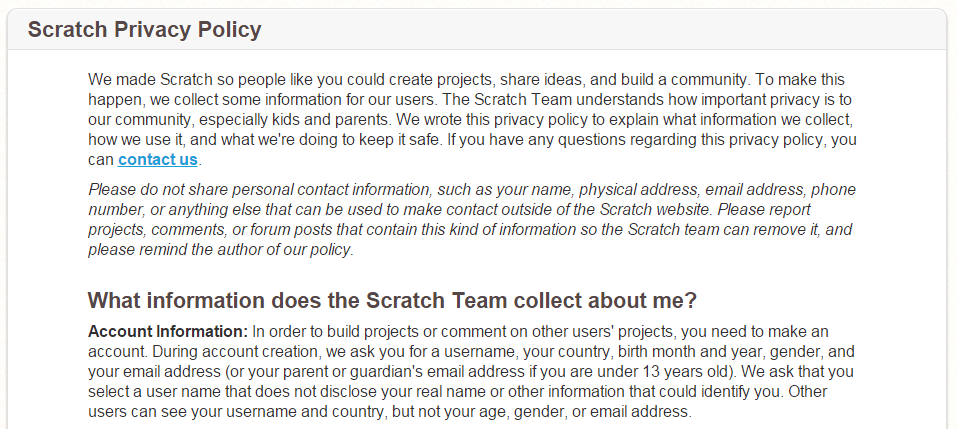
Considering the above definition, respectable institutions and websites, define their privacy policies. A privacy policy is a document containing legal definitions or statements about the ways a party gathers, uses and discloses client´s or customer´s personal information.  For example, the following screenshot shows you a section of the Scratch website privacy policy. It´s a good idea to take a look at the original document before creating an account.


Some tips you might consider interesting: (VA)

  • Do not disclose any personal information unless absolutely necessary. 
  • Use nicknames whenever possible to create on-line accounts.
  • Do not over-share information on social networks, or any other website.
  • Avoid whenever possible unsecured Wi-Fi connections.
  • Don not leave your computer unattended and use a screen lock with password. 
  • Use a password protected screen locker for your smartphone. 
  • If you know about, or suspect about, illegal personal data information usage report to authorities. 

Saturday, June 11, 2016

Gamification !


La "gamification" (en lengua española “Gamificación” o “ludificación”) sugiere en este sentido, el poder utilizar elementos del juego, y el diseño de juegos, para mejorar el compromiso y la motivación de los participantes. El concepto definido por Deterding, Dixon, Khaled y Nacke en el artículo Gamification: Toward a definition en 2011, se refiere al uso de elementos de diseño de juegos en contextos que no son de juego.
Publicación electrónica: "Gamificación en las aulas universitarias"
Ruth Contreras
José Luis Eguia


La definición del concepto encierra una clave importante "...uso de elementos de diseño de juego...", esta frase transmite un mensaje a considerar, es que no reemplazaremos los objetivos educativos con simples juegos o entretenimientos. El objetivo es utilizar los elementos del juego para crear interés un una audiencia cada vez más dispersa y capturada por los medios. Una audiencia que de por sí ludifica aspectos tan centrales como la interacción social en las redes sociales. Incluso los desarrolladores de nuevos dispositivos tecnológicos y aplicaciones para móviles enfocan en diseñar experiencias de uso cada vez más cercanas a los elementos de un juego.

La cantidad de "likes" obtenidos es determinante para medir el éxito en las redes sociales, no la calidad de las interacciones ni el contenido de las mismas. 

El desafío consistiría en diseñar los materiales educativos de forma más atractiva, utilizando elementos del diseño de los medios sociales o elementos del diseño de juegos, sin banalizar el contenido académico.  En su libro "La civilización del espectáculo", Vargas Llosa aborda críticamente la problemática  de una sociedad donde el entretenimiento es realzado como valor. Afirma que, el entretenimiento como valor supremo conlleva a la banalización de la cultura y la generalización de la frivolidad.

En el grupo de los defensores de la incorporación de los juegos en el ámbito académico, se encuentran los dos autores mencionados al principio de este artículo. Y citan a Kapp, quien  afirma que los elementos de juego generan un cambio en el comportamiento de las personas de forma positiva, y les motivan a moverse a través de actividades de instrucción para lograr las metas. Metas educativas fijadas en un contexto académico y trayectos formativos diseñados a tal fin. El juego, según esta perspectiva, es un envoltorio para distribuir contenidos.

Existen emprendimientos educativos asombrosos y valiosos que aplican la teoría del juego y la ludificación. Un ejemplo de ello es cómo John Hunter utiliza el juego de la paz mundial como una simulación política de los complejos resortes de las relaciones internacionales. Utiliza el juego como medio para acercar conceptos complejos sin banalizar su contenido educativo.


Friday, June 10, 2016

Design tip 2 - Tables for simple layouts


HTML was originally designed as a semantic markup language intended for sharing scientific documents and research papers online. Visual presentation was left up to the user. However, as the Internet expanded from the academic and research world into the mainstream in the mid-1990s, and became more media oriented, graphic designers sought ways to control the visual appearance of the Web pages presented to end users. To this end, tables and spacers (usually transparent single pixel .GIF images with explicitly specified width and height) have been used to create and maintain page layout.


Although HTML tables are a rudimentary tool, it might seem a good idea to use them for basic web page designs. While using CSS language a wed designer might achieve professional results, HTML tags are much more simpler to use. And you can nest them in <div> sections. In some contexts, like blogger post editors for example, HTML tools are not available. In such situations an On-Line  HTML generator is a savior. Here some of them:

Tables generators: this website offers a number of table generators, the HTML Tables sections present a rather complete, jet simple to use, tool. Remember, if your blogger account does not support CSS, use the HTML only option.

Rapid Tables: this second suggested website offers a rather complete HTML table generator. The user has a number of interesting options, like size in percentages, color schemes, cell padding and many more options.


Sources of information:

Thursday, June 9, 2016

Feedback

Wednesday, June 8, 2016

TED Video series

Based on Mark Anderson´s post.


Welcome to this selection of TED videos on being an innovative modern educator. TED has a long history of hosting inspirational characters, who share their vision of innovative educational projects. The already legendary talk held by Ken Robinson, titled "Do schools kill creativity",  signaled (at least for me) the beginning of a series of inspirational talks about education. Here I share with you some of my favorites.


  • If you’re interested in TED lessons or joining the TED education group, you can explore ed TED collaboratives and resources here: http://ed.ted.com/lessons


Padlet en acción !


En un post anterior (20 de mayo "Padlet - Tablones de anuncios") compartí con ustedes una muy breve introducción al uso de padlet. En esta ocasión comparto un muro creado con el objetivo de compartir algunas recomendaciones de seguridad informática. Podrá ver que un tablón de anuncios puede ser insertado en un artículo del Blog, al tiempo que se informará sobre algunos consejos de seguridad.


Tuesday, June 7, 2016

Padlet - Tablones de anuncios


Padlet es una sencilla herramienta On-Line que le permitirá crear tablones de anuncios o notas virtuales. El tablón de anuncio que crea el usuario tiene una dirección web (URL) que lo identifica en forma única. Los anuncios virtuales pueden contener: texto, imágenes, videos o audios. En general es posible combinar texto con una imagen o video. El acceso a los tablones puede ser público o restringido, con o sin contraseña de acceso y con diferentes niveles de permisos para los visitantes. Así, un visitante podrá por ejemplo: acceder un tablón mediante el uso de una contraseña para leer su contenido o para editarlo.


Monday, June 6, 2016

Working with spreadsheets


As part of our standard syllabus, all second year courses are now working with spreadsheets. A wide range of concepts are covered, some of them are: arranging numerical information in table formats, performing calculations and charts. Both, practical and theory approaches are of value to us, to understand how we can use computers in our daily life.


Saturday, June 4, 2016

Design tip 1 - Bulleted lists


Designing a good presentation, a well balanced post or even a simple Word document, demand a great effort and time. Professional designers usually began their skills development at HS, then continued to a bachelors degree and most probably a Mg. degree. So, you are at the beginning of what might be great professional opportunity...   As with almost all in life, first steps are usually clumsy, but filled with expectations.

This post is the first one of a series dedicated to share some design tips for your blogs. As instructed in class, this are the minimum design skills you should practice. Firstly try to "imitate" or copy the basic ideas, most of them learned from professional designers websites. After a while you feel comfortable with them,  progress to the next level and create your own ones. 


Idea number 1 - Replace the standard bullet


Lorem Ipsum is simply dummy text of the printing and typesetting industry. Lorem Ipsum has been the industry's standard dummy text ever since the 1500s, when an unknown printer took a galley of type and scrambled it to make a type specimen book.

It has survived not only five centuries, but also the leap into electronic typesetting, remaining essentially unchanged. It was popularised in the 1960s with the release of Letraset sheets containing Lorem Ipsum passages, and more recently with desktop publishing software like Aldus PageMaker including versions of Lorem Ipsum.


Idea number 2 - Replace the list with boxes 


Sources of information

Thursday, June 2, 2016

Alice 3.0


Alice is a freeware object-based educational programming language with an integrated development environment (IDE). Alice uses a drag and drop environment to create computer animations using 3D models. The software was developed first at University of Virginia in 1994, then Carnegie Mellon (from 1997), by a research group led by the late Randy Pausch.


Alice is designed solely to teach programming theory without the complex semantics of production languages


Here are a few reasons why learning programming is important. Students use many digital tools and applications as natural as counting 1, 2, 3. Smartphones, computers, Youtube, Netflix, and Facebook are embedded in their daily lives. Even toys are digital, think about Lego Mindstorms. It is one thing to know how to use these technologies. It’s another, however, to understand the logic behind them. When learning to program, kids understand and tinker with the digital world they inhabit. Coding draws back the seeming “magic” of technology so they can truly understand the logic and science that controls this technology–a discovery that is all the more magical.


"Software is really about humanity, that is about helping people by using computer´s technology. It would have changed my outlook a lot earlier."
Vanessa, creator of "Girl Develop IT"


Learning how to program is like learning any other language in that the skill must be practiced and tested out. Just as languages open up the ability to communicate with worlds of people, programming gives children the ability to create technologies that impact those around them. With just a computer, kids can use their programming skills to build things that could change the world.


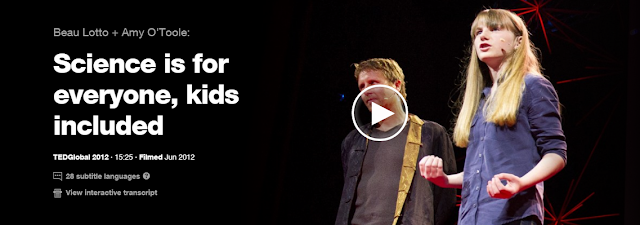
The video is titled "What most schools don´t teach". 
Well, here at Goethe Schule Buenos Aires, we do !